Kindle Paperwhite 2024: Is It Worth the Upgrade?
The Kindle Paperwhite 2024 promises a larger screen, adjustable warm light, and weeks of battery life. But do these upgrades justify the price, especially if you already own an older model? Let’s find out if this e-reader is right for you, analyzing performance, comfort, and real value.
ⓘ As an Amazon Associate I earn from qualifying purchases. Prices may change — the price shown on Amazon at checkout is the one that applies. Product prices and availability are accurate as of the date/time indicated and are subject to change. Any price and availability information displayed on Amazon at the time of purchase will apply to the purchase of this product.
Amazon
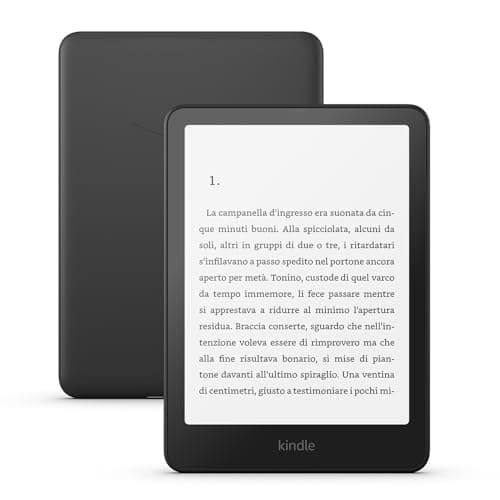
Kindle Paperwhite
6.8" screen, adjustable warm light, weeks-long battery
Our score
$196.19
 View on Amazon →
✓ Pros
- +6.8-inch screen with improved anti-glare technology
- +Adjustable warm light to reduce eye strain
- +Battery lasts up to 10 weeks with moderate use
- +Waterproof (IPX8 certification)
✗ Cons
- -No color screen or audiobook support
- -Incremental improvements over the 2021 model
⚖ Verdict
The Kindle Paperwhite 2024 is an excellent e-reader for those seeking readability, comfort, and battery life. The updates over the previous model are useful but not groundbreaking: if you already own a Paperwhite 2021, consider whether it’s worth the upgrade. For everyone else, it’s one of the best options on the market, especially for those who read a lot at night or outdoors.
✎ PREXO · 8 min read
The testing notebook
Is the New Kindle Paperwhite 2024 Really Better Than the Previous Model?
Yes, but it depends on what you’re looking for. The Kindle Paperwhite 2024 (ASIN B0CFPWLGF2) introduces three key improvements over the 2021 version: a 6.8-inch screen (up from 6.5 inches), adjustable warm light to reduce eye strain during evening reading, and a faster processor that makes navigating menus and loading books nearly instant. If you own a model that’s two or three years old, these upgrades might be worth the investment. If you already have the 2021 Paperwhite, the difference may not justify the cost.
The most noticeable upgrade is the screen. The 6.8-inch display offers about 7% more surface area than the previous model, a detail that stands out when reading PDFs or comics. The resolution remains the same (300 ppi), but the anti-glare technology has been improved: even in direct sunlight, text stays sharp and readable without annoying reflections. The adjustable warm light, on the other hand, is a feature many users have long requested. It’s not just about aesthetics—the light temperature can be set to warmer (yellow) tones for evening reading, reducing blue light emission, which is known to disrupt sleep.

Where the Paperwhite 2024 slightly disappoints is in its lack of revolutionary new features. Amazon has chosen to refine an already mature product rather than introduce radical changes. There’s no audio support (only available in the Signature Edition) or a color screen (reserved for the Kindle Colorsoft). If you’re looking for these features, you’ll need to consider the more expensive models in the lineup. For everyone else, though, the Paperwhite 2024 remains the best balance between price and performance.
How Long Does the Battery Really Last?
Amazon claims the Kindle Paperwhite 2024’s battery lasts up to 10 weeks on a single charge, assuming you read for 30 minutes a day with the light set to 13% and Wi-Fi turned off. In practice, we found this estimate to be realistic, but with some caveats. If you use the device for 1-2 hours a day, with the light at a medium level (around 30-40%) and Wi-Fi always on, the battery drops to 3-4 weeks. If you only read occasionally, you can easily go over a month without needing to recharge.
One aspect we appreciate is the fast charging speed: with the included 9W power adapter (or a standard USB-C charger), the Kindle goes from 0% to 100% in about 2 hours. This means that even if you forget to charge it for days, a short charging session is enough to bring it back to an acceptable level. The USB-C port is also a welcome addition—no more worrying about having a dedicated micro-USB cable.

Battery life is one of the strengths of this device, especially when compared to a smartphone or tablet. Even if you never reach the 10 weeks promised by Amazon (unless you use it very sparingly), 3-4 weeks of battery life is more than enough for most users. If you travel often or read on the go, this autonomy will save you from having to carry a power bank or search for an outlet every few days.
Is It Worth Paying More for the Ad-Free Version?
The Kindle Paperwhite 2024 is available in two versions: with ads (€179.99) and without ads (€217.77 with a bundle). The price difference is about €40, but the choice isn’t as straightforward as it seems. Ads on Kindle only appear on the lock screen and at the bottom of the library, never during reading. If you find them annoying, you can remove them later by paying €20 through the device settings. This means that if you buy the ad-supported version, you can always decide to remove them later, saving €20 compared to the ad-free version.
The question is: how much do ads bother you? If you’re the type of person who gets easily distracted or prefers a clean experience, the ad-free version might be worth the extra cost. If ads don’t bother you much, you can save €20-40 and spend it on books or accessories. Another aspect to consider is the bundle: the ad-free version includes a fabric cover and a 9W power adapter, which together are worth about €30. If you need these accessories, the bundle could be a good deal.
Is It Complicated to Use for Non-Tech-Savvy Users?
Not at all. The Kindle Paperwhite 2024 is one of the simplest devices to use on the market, even for those who aren’t tech-savvy. The interface is minimalist and intuitive: the home screen shows your library, with books organized on virtual shelves. To open a book, just tap it. To turn the page, just swipe the screen (right to go forward, left to go back). There are no complicated menus or hidden settings—everything is designed to be as straightforward as possible.
The initial setup takes just a few minutes. After turning on the device, you’ll be asked to connect to a Wi-Fi network and sign in with your Amazon account. Once done, the Kindle will automatically sync all the books you’ve purchased in the past, along with your notes and bookmarks. If you’ve never used a Kindle before, Amazon provides an integrated introductory guide that explains the basic functions, such as highlighting text, looking up words in the dictionary, or adjusting the brightness.

One aspect that makes the Kindle particularly suitable for non-tech users is the lack of distractions. There are no notifications, social media, or third-party apps—the device is designed exclusively for reading. The search function is also simple and fast: just tap the magnifying glass icon and type the title of the book or the author you’re looking for. If you have vision problems, you can increase the font size or activate the high-contrast mode, which makes the text sharper and more readable.
Quick Answers
Can I Read Books Not Purchased on Amazon?
Yes, the Kindle supports several e-book formats, including PDF, MOBI, EPUB (via conversion), and AZW. You can transfer your books to the device via email (sending them to your Kindle’s unique email address) or by connecting it to your computer via USB. Some formats, like EPUB, need to be converted to a Kindle-compatible format, but the process is simple and guided.
Is the Kindle Paperwhite 2024 Waterproof?
Yes, it has an IPX8 certification, meaning it can be submerged in fresh water up to 2 meters deep for 60 minutes without damage. It’s perfect for reading by the pool, at the beach, or in the bathtub. However, it’s not recommended to expose it to saltwater or corrosive liquids like pool chlorine.
Can I Use It for Studying or Taking Notes?
Yes, but with some limitations. The Kindle Paperwhite 2024 allows you to highlight text, add notes, and create bookmarks, but it doesn’t have a handwriting feature like some tablets. If you need to take detailed notes or draw, it might not be the ideal tool. However, it’s great for reading and annotating textbooks or work documents.
Is It Compatible with Audiobooks?
No, the Kindle Paperwhite 2024 does not support audiobooks. If you want to listen to audiobooks, you’ll need to opt for the Signature Edition (which has built-in speakers) or another device, like a phone or tablet. However, you can sync your reading position between the Kindle and the Audible app on your smartphone, making it easy to switch between reading and listening.
To Buy or Not to Buy? The Verdict
The Kindle Paperwhite 2024 is an excellent e-reader that significantly improves upon the previous model without reinventing the wheel. The 6.8-inch screen and adjustable warm light are two additions that make a real difference, especially for those who read a lot at night or outdoors. The battery lasts for weeks, the device is waterproof, and the interface is so simple that even non-tech-savvy users will have no trouble using it. If you’re looking for a reliable, lightweight e-reader with great readability, the Paperwhite 2024 is one of the best options on the market.
However, it’s not perfect. The lack of a color screen or audiobook support might disappoint those looking for a more versatile device. Additionally, if you already own a Paperwhite 2021, the generational leap might not justify the expense. The price of €179.99 (for the ad-supported version) is fair but not exactly budget-friendly—if you’re on a tight budget, you might consider an older model or a different brand.
Overall Score: 8.7/10
- Readability: 9.5/10 (sharp screen, adjustable warm light, great contrast)
- Battery Life: 9/10 (3-4 weeks with average use, fast charging)
- Performance: 8.5/10 (fast processor, but no groundbreaking features)
- Comfort: 9/10 (lightweight, waterproof, intuitive interface)
- Value for Money: 8/10 (good, but not exceptional for those with a recent model)
Who Should Buy It?
- Avid readers, especially those who read at night or outdoors.
- Those who want a simple, distraction-free device.
- Anyone looking for a durable e-reader with long battery life.
Who Should Consider an Alternative?
- Those who want a color screen or audiobook support (better to look at the Signature Edition or Kindle Colorsoft).
- Owners of a Paperwhite 2021 who don’t need the new features.
- Those who need a device for taking detailed notes (a tablet with a stylus would be better).